ACH Management
Sprout supports payments via ACH to vendors. To use ACH payments some prerequisite steps must be completed first.
Enable ACH For A Vendor
Under AP - Vendors open the vendor and select the accounting tab.
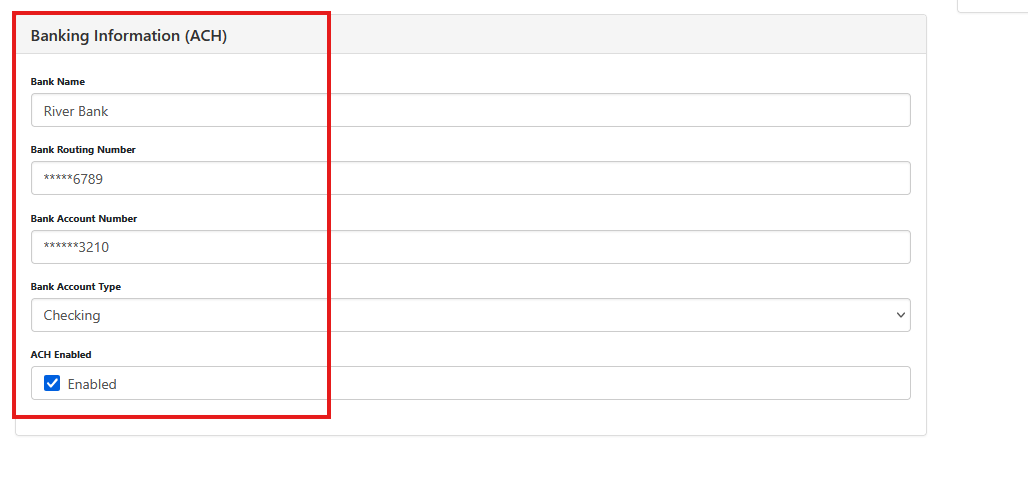
Check ACH Enabled. The bank name, routing, account and type are optional. Without that information filled in a NACHA file can’t be created for transmission to the bank. An ACH payment can still be made in Sprout, but the actual payment must be keyed in to the bank.
For more information on NACHA files, please contact Anovys Support.
ACH Reference Email
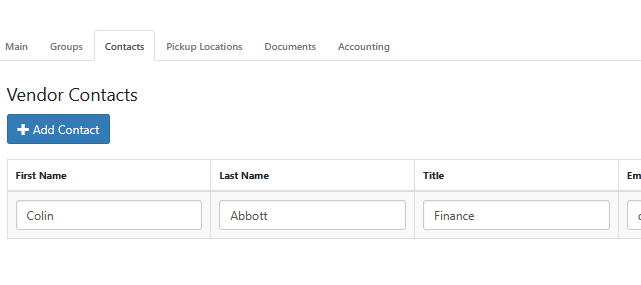
When sending an ACH Sprout can also send an automated email to the recipient informing them of the ACH that was processed as well as the invoices that are paid. To enable this for a vendor open the Contacts tab of the vendor and choose Add Contact
This contact must be set to Contact Type: ACH Remittance
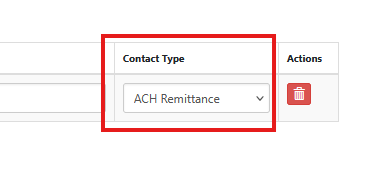
Note, a contact must be repeated if the contact is used for multiple different type functions.