Account Defaults
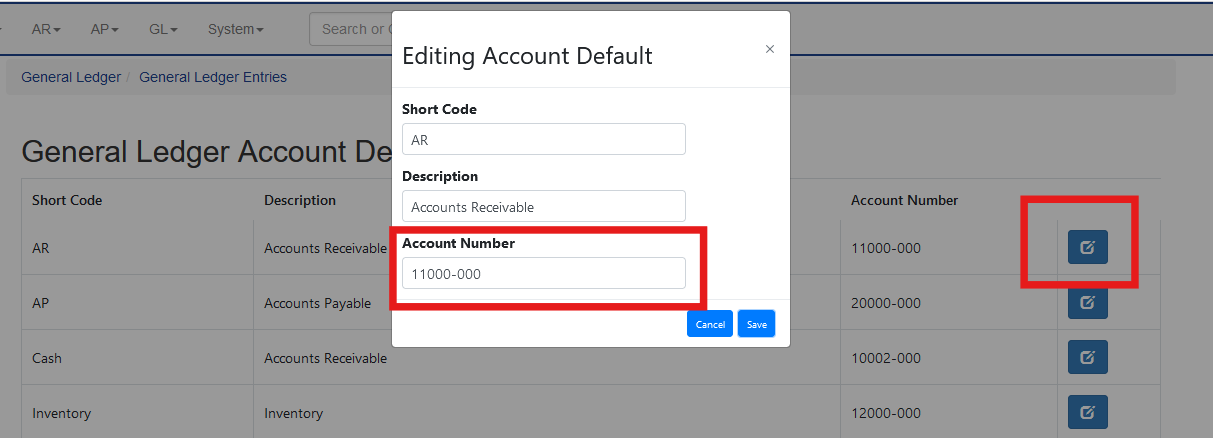
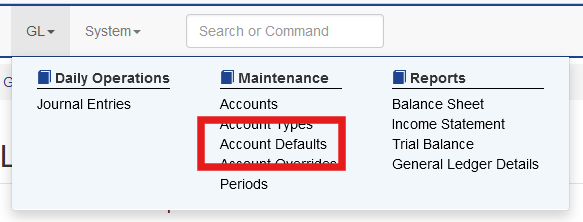
Sprout uses account defaults for all GL transactions within that category. The defaults are found under GL - Account Defaults.
These defaults do not directly go to financial statements, but their selected general ledger account and the general ledger account’s type do impact what financial statement the transaction appears on.
Account Defaults and their Uses
The table below shows all current Account Defaults and their use. This is used by Sprout to set defaults, but in many cases, such as inventory and adjustments, this is overridden by specific items or adjustment reasons
|
Account Default |
Use |
Financial Statement |
Required |
|
Accounts Receivable |
The default for accounts receivable transactions |
Balance Sheet |
Yes |
|
Accounts Payable |
The default for accounts payable |
Balance Sheet |
Yes |
|
Cash |
The default for cash transactions |
Balance Sheet |
Yes |
|
Inventory |
The default for inventory transactions - this can be overridden at the item level |
Balance Sheet |
Yes |
|
Inventory Suspense |
This is often used for manual GL entries or when an integration is created without a matching GL category. It is not typically used in normal day to day activity and can be left blank. |
Balance Sheet |
No |
|
Inventory Adjustments |
The default used for inventory adjustments - this can be overridden at the adjustment reason level |
Income Statement |
Yes |
|
Sales Tax |
The default for sales tax records |
Balance Sheet |
No |
|
Sales |
The default used to record sales - this can be overridden at the item level |
Income Statement |
Yes |
|
Cost of Goods Sold |
The default used to record cost of goods - this can be overridden at the item level |
Income Statement |
Yes |
|
Undeposited |
The default for cash received, but not deposited |
Balance Sheet |
Yes |
|
Sales Discount |
The default for sales discounts - this can be modified at the customer level |
Income Statement |
Yes |
|
Accounts Payable Discount |
The default for vendor discounts - this can be overridden at the vendor level |
Income Statement |
Yes |
|
Earnings |
The default for retained earnings at year end close |
Balance Sheet |
Yes |
|
Net Income |
The default for net income at year end |
Balance Sheet |
Yes |
|
Goods Received Not Invoiced / Unvouchered Payable |
The default for purchases that have been received and accrued, but the invoice has not been applied |
Balance Sheet |
Yes |
|
Sales Returns and Allowances |
Used when a receivable credit is entered |
Income Statement |
Yes |
|
Unapplied Customer Credits |
Credits given to a customer but not applied to a specific invoice. This credit can be used laster |
Balance Sheet |
Yes |
|
Unapplied Customer Cash Receipts |
Cash receipt received from a customer, but not applied to a specific invoice. This can be used later. |
Balance Sheet |
Yes |
|
Inventory Adjustments |
The default used when adjusting inventory - this can be overridden at the inventory adjustment reason level |
Balance Sheet |
Yes |
|
Realized Foreign Exchange Gains and Losses |
Used when the foreign exchange module is used to record gains and losses Only Required if the Foreign Exchange module is used |
Income Statement |
No |
|
Vendor Credit |
A credit applied to a vendors payable invoice |
Balance Sheet |
Yes |
|
Packing Variance |
This is for variances occurring during component cost changes after receipt |
Balance Sheet |
No |
|
COGS Rounding Adjustment |
When using Sprout for kit/BOM building there can be some costs that are less than one cent. This account default holds the rounding differences |
Income Statement |
No |
|
FXVariance |
Used to account for small variances between different currencies Only Required if the Foreign Exchange module is used |
Income Statement |
No |
|
APInvoiceVariance |
Accounts for small differences between an AP invoice and invoiced receipts without required changes to POs, etc. |
Income Statement |
No |
|
VendorExpense |
This is the default vendor expense account used if the vendor does not have a specific expense GL account set or if a non stock item does not have an expense account set. |
Income Statement |
Yes |
|
AccrualWriteOff |
This is used specifically if an accrued payable is written off and not either paid or credited |
Income Statement |
Yes |
Updating Account Number Used
To edit a default account, click the edit number and enter the new account. This will not change historical uses, but will be used for new entries. The name and description can’t be changed.