
Basic PO Requirements
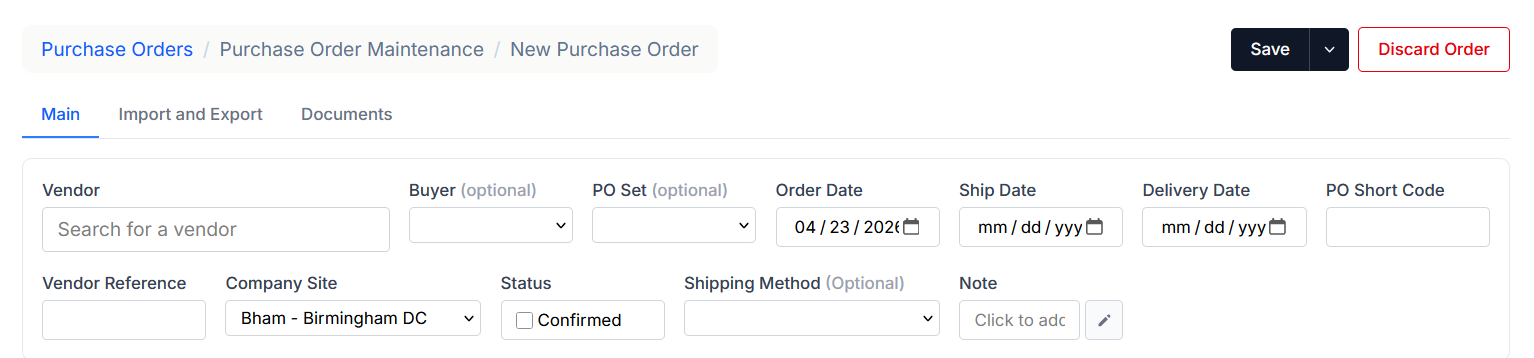
Several fields are required when creating a purchase order.
Vendor Code
The vendor must be selected when creating a purchase order. In the Vendor Code/Search field, users can type the vendor’s code, name, or part of the name to search for and locate the correct vendor.
Delivery Date
The expected delivery date for the purchase order.
Company Site
The company site receiving the purchase order.
Additional Options
Additional free-text fields are also available. These are not required but can be helpful later in the purchasing or receiving process.
Examples include:
- PO Short Code
- Vendor Reference
- Shipping Method
These fields may appear throughout the purchasing workflow and can be used for reporting, documentation, or internal reference.
Back Date Restrictions
Only users with specific rights can create a PO date with a prior date. Users without that right will see the calendar blocked out for prior dates. For example, the current date in the image below is 4/16/2026. All dates prior to 4/16/2026 are inactive
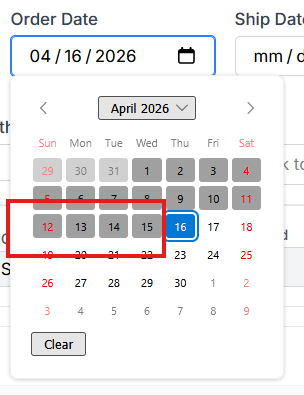
The right under PO named po.backdate will allow backdating.