Configuring EDI For Customres
Once an EDI connection is configured for a customer controlling what data and when it is sent can be done at the customer site level.
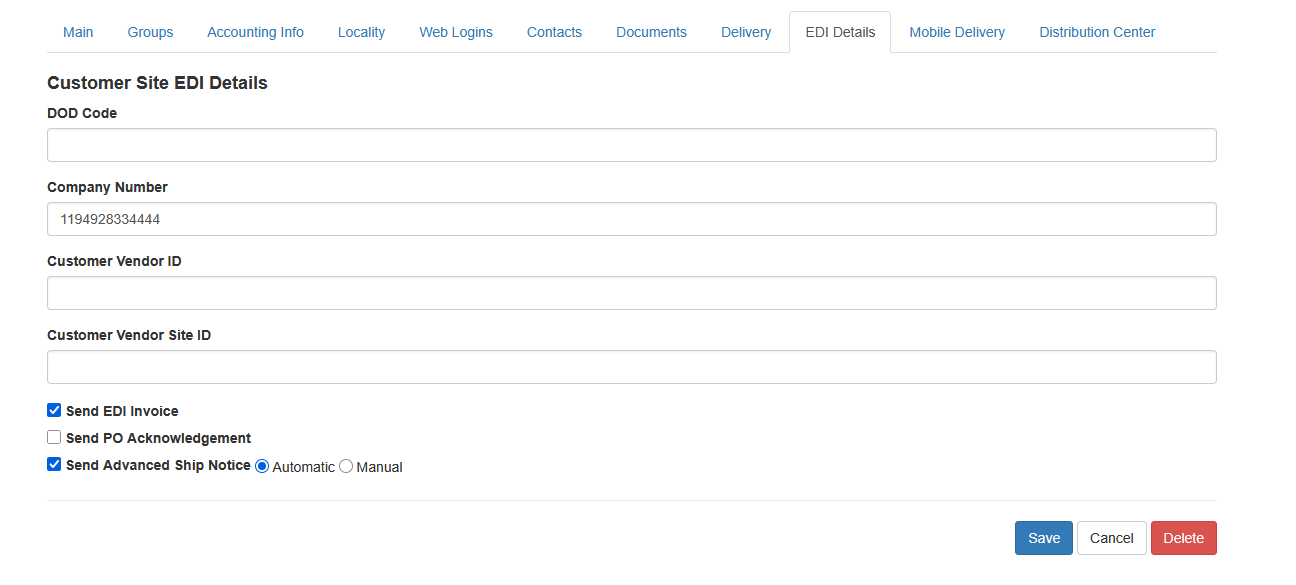
To make adjustments locate the customer, visit the customer site tab and edit the particular site. From there choose the EDI Details tab
 .
.
The company codes, numbers and IDs are used to identify the physical location to the EDI partner. These are used differently for each EDI transaction. Anovys will instruct the user how each field is used for the particular transaction.
Sending EDI Invoices
The Send EDI Invoice box tells Sprout to transmit when a sales order is billed. This will send an EDI810 or similar file.
Resending EDI Invoices
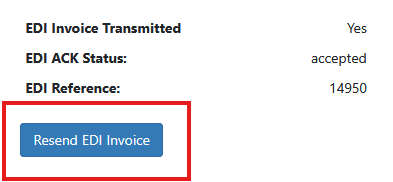
Occasionally a customer may request an invoice get resent. Locate the invoice under AR - Invoices. The current EDI transmit status will show for the invoice and the acknowledgement information. To resend it click Resend EDI Invoice. The status will turn to EDI Invoice Transmitted: No. Within 30 minutes Sprout will resend the invoice. Once the associated 997 is returned the result code will update on this screen.
Sending PO Acknowledgment
The Send PO Acknowledgment is used to automatically send an EDI855 when a PO from a customer is received.
Sending Advanced Ship Notices
The Send Advanced Ship Notice is used to tell Sprout to send ASNs or EDI856 files. This also has an automatic or manual setting.
Automatic ASN
When a customer is set to receive their ASNs automatically the ASN is sent immediately when a physical invoice is printed within Sprout. This is the action that tells Sprout the invoice selection is complete. NOTE: The user can simply view the printed invoice as well if a paper copy is not needed.
Manual ASN
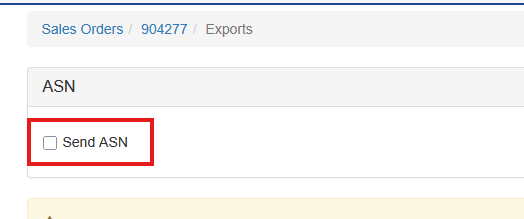
When the ASN type is set to manaul the user must take action to send the ASN. Once a invoice has been printed the user must select Go To - Sales Order Exports from the Sales Order screen. Check the Send ASN box. The ASN will then transmit within the next 30 minutes