Confirmation of Sale
Some users require a Confirmation of Sale (COS) document. This is commonly used for international shipments where customs or regulatory documentation is required or other situations where formal documentation of the purchase is required.
A Confirmation of Sale is generated from the Purchase Order screen.
Notes on Weight
Confirmation of Sale documents often include fields for gross weight and net weight.
Sprout maintains both gross and net weight values in Item Unit of Measure Setup.
If only one of these values is configured for an item, Sprout will automatically use that value for both gross and net weight when generating the Confirmation of Sale.
Editing the COS
Sprout generates the Confirmation of Sale as a PDF document.
The PDF is fully editable when opened with a compatible PDF editor. However, any edits made directly to the PDF do not update the data stored in Sprout.
If changes need to be made permanently, the user must:
- Update the appropriate data in Sprout.
- Reprint the Confirmation of Sale document.
Canadian COS
Sprout supports the Canadian CFIA / ACIA 3885 form as a Confirmation of Sale option.
To generate a Confirmation of Sale:
- Create a Purchase Order.
- Add the required items.
- Save the purchase order.
- Click the Drop down on Save and choose COS
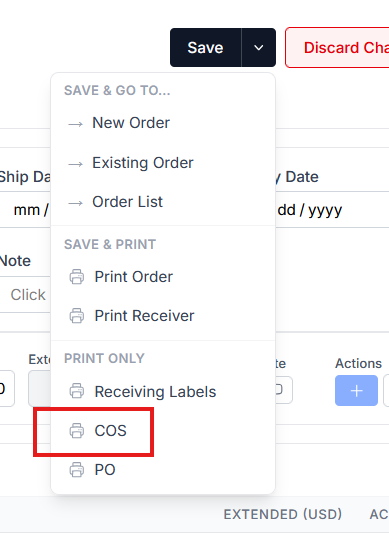
The Confirmation of Sale will be generated as a PDF that can be:
- printed
- saved
- or both
Printing COS for a Purchase Order Set
Users can also generate Confirmations of Sale for all purchase orders within a Purchase Order Set.
To do this:
- Open the Purchase Order Set.
- Select Print COS.
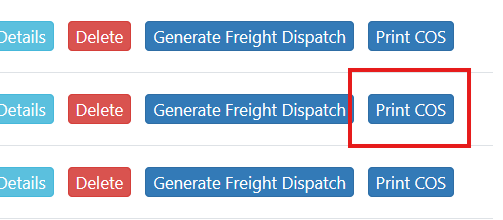
Sprout will generate a single PDF containing multiple pages, with one Confirmation of Sale for each purchase order in the set.