Creating or Editing Adjustment Reasons
Inventory Adjustment Reasons explain why inventory is being increased or decreased. Each reason also controls how the adjustment is valued and which general ledger account is used. Set up the reasons before users enter inventory adjustments or process item returns and scrap on customer credits.
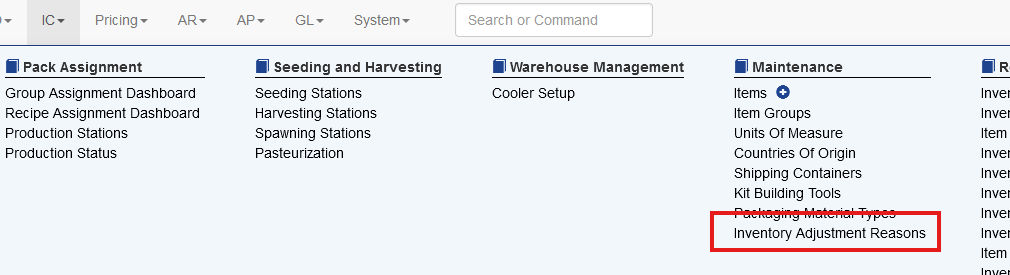
The system has default reasons, and any additional reasons can be added. This screen allows the user to edit both reduction (adjustment out) and increase (adjustment in) reasons.
Set up an Inventory Adjustment Reason
- Select IC > Inventory Adjustment Reasons.
- Select Add New Reason.
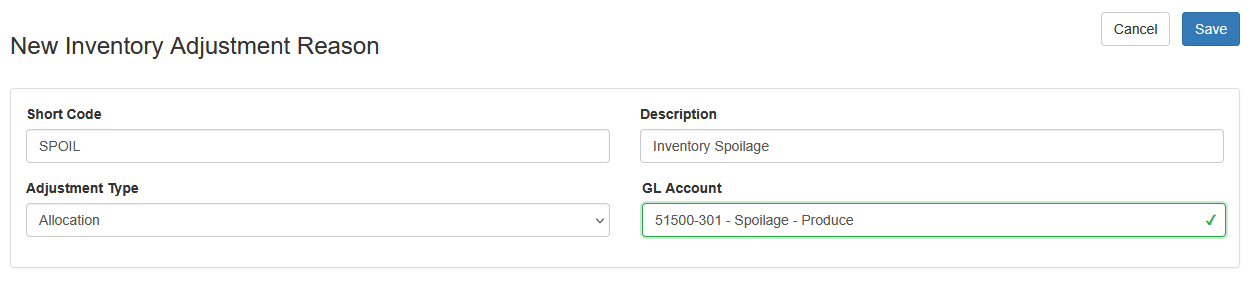
- Complete the fields described below.
- Select Save.
Additional Considerations for Adjustment In Reasons
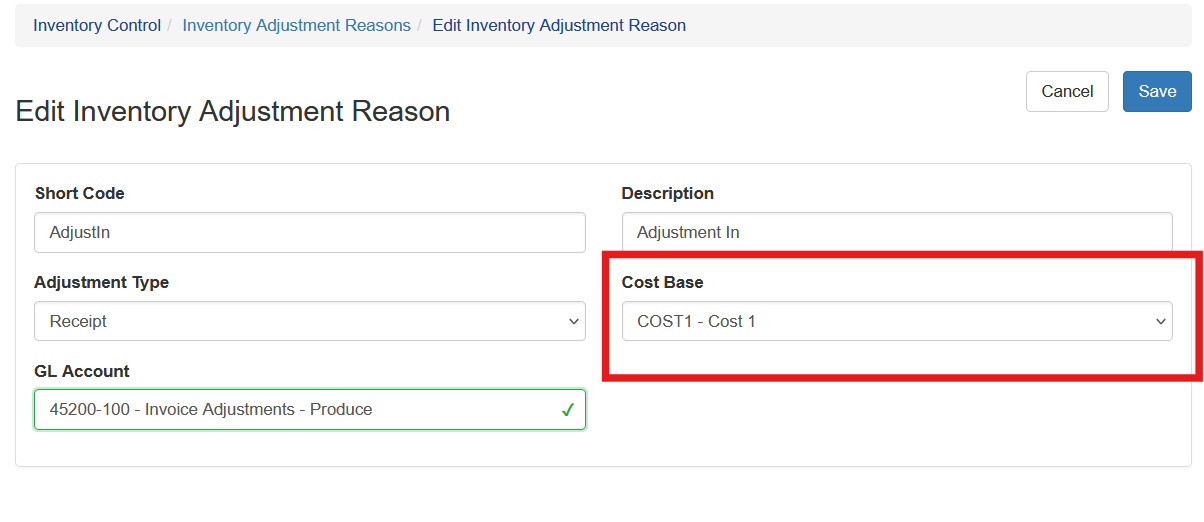
When creating adjustment reasons for adjusting in inventory, a cost base must be selected as well. This is used to determine the value of the inventory. The cost can be changed during the adjustment creation. It is important to use a Cost Base that is representative of an actual cost.
|
Description |
|
|
Short Code |
A unique code of up to 10 characters. The short code and description identify the reason in selection lists. |
|
Description |
A description of up to 30 characters that tells users when to select the reason. |
|
Adjustment Type |
Select Receipt to increase inventory or Allocation to decrease inventory. This choice determines where the reason is available in Sprout. |
|
Cost Base |
Required for a Receipt reason. Sprout uses the selected pricing cost base to suggest the cost of inventory being adjusted in. |
|
GL Account |
The general ledger account associated with the reason. When a user selects the reason on an adjustment, this account is supplied as the adjustment account. Users with the appropriate rights can override it on the transaction. |
Choose the Adjustment Type carefully. Return reasons that put sellable product back into inventory must be Receipt reasons. Scrap reasons and Undo Build Kit reasons remove inventory and must be Allocation reasons.
Set Company Site defaults
Inventory Adjustment Reasons can be assigned as defaults for each Company Site.
- Select System > Company Sites.
- Edit the Company Site.
- Select the appropriate reason in each default field.
- Select Save.
|
Required reason type |
Where the default is used |
|
|
Default Return Inventory Adjustment Reason |
Receipt |
Suggested when an item-level customer credit returns product to inventory. Sprout first uses the customer's Company Site; if the customer does not have one, it uses the current user's default Company Site. |
|
Default Scrap Inventory Adjustment Reason |
Allocation |
Suggested when an item-level customer credit scraps product. Sprout first uses the customer's Company Site; if the customer does not have one, it uses the current user's default Company Site. |
|
Default Undo Build Kit Adjustment Reason |
Allocation |
Suggested when a user reverses, or undoes, a Build Kit receipt from the receipt detail or Work in Process Build Report. |
The Company Site fields only list reasons of the correct type. A default may be left as None, but the user will then need to choose a reason when the related transaction requires one.
Where Inventory Adjustment Reasons are used
Inventory adjustments
On IC > Inventory Adjustments, the user first selects whether the adjustment is a Receipt or Allocation. Sprout then limits the Reason list to reasons with that Adjustment Type. Selecting the reason supplies its GL account. For Receipt adjustments, Sprout also uses the reason's Cost Base to suggest the cost.
Customer credits with item references
On a credit entered through AR > Receivable Transactions, users can reference an invoiced item and enter quantities returned to inventory, scrapped, and credited to the customer.
- A returned quantity uses a Receipt reason and adds the quantity back to inventory.
- A scrapped quantity uses an Allocation reason. Sprout records the inventory movement and the related adjustment entries needed for the scrap.
- Company Site defaults prefill these selections when they have been configured, but the user can select a different valid reason.
The Inventory Adjustment Reason is separate from the Receivable Transaction Credit Reason. The Credit Reason explains the financial credit as a whole; the Inventory Adjustment Reasons explain the physical return or scrap movements.
Undo Build Kit
When a user undoes a Build Kit receipt, Sprout can preselect the Company Site's Default Undo Build Kit Adjustment Reason for the component quantities being removed.
Reports and accounting
Inventory Adjustment Reasons appear on the Inventory Adjustments list and Inventory Adjustment Report and can be used to filter the report. Saving an adjustment creates the related inventory and general ledger activity. The reason's GL account is used as the adjustment account unless an authorized user overrides the account on the adjustment.
Editing and deleting reasons
Use the pencil icon on IC > Inventory Adjustment Reasons to change a reason. Changes affect how the reason is presented or defaulted in future work; they do not rewrite the quantities or values of transactions already saved.

Before deleting a reason, remove it from any Company Site default and confirm that it is not needed for transaction history. If Sprout prevents deletion, the reason is still referenced and should remain in place or be replaced in the related setup.
Recommended setup
- Use short codes that are easy to recognize in transaction lists and reports.
- Create separate reasons when different causes must post to different GL accounts or be reported separately.
- Write descriptions that tell the user when to choose the reason, such as Customer Return - Resalable, Damaged Product, or Cycle Count Gain.
- Confirm the Adjustment Type, Cost Base, and GL Account with accounting before the reason is used.
- Configure all three Company Site defaults for every site that uses customer returns, scrap, or Build Kits.