Adding Credit Reason Codes
Receivable Transaction Credit Reasons explain why a customer credit is issued and determine the general ledger account used for the credit. Set up Credit Reasons before users create customer credits in Receivable Transactions.

Set up a Receivable Transaction Credit Reason
- Select AR > Receivable Transaction Credit Reasons.
- Select Add New Reason.
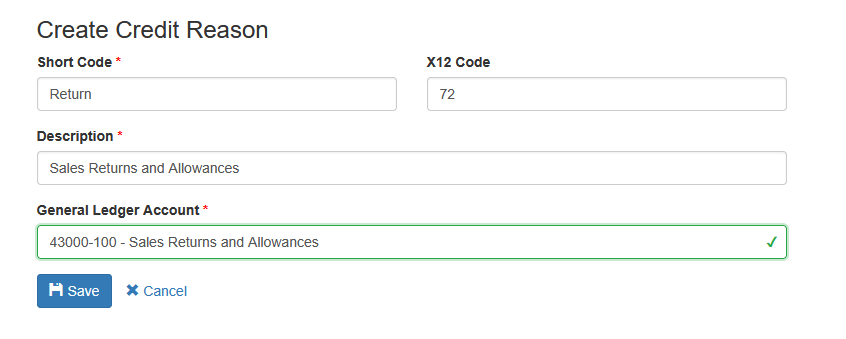
- Complete the fields described below.
- Select Save.
|
Field |
Description |
|
Short Code |
A unique code of up to 10 characters. It appears with the description in the Credit Reason list. |
|
X12 Code |
An optional ANSI X12 adjustment reason code of up to 10 characters. Use it when the credit reason must map to an EDI transaction, such as an EDI 812. Confirm customer-specific requirements before assigning a code. |
|
Description |
A description of up to 50 characters that tells users when to select the reason. |
|
General Ledger Account |
Required. Sprout uses this account for the sales return or allowance side of a customer credit that has this Credit Reason. |
Where Receivable Transaction Credit Reasons are used
To issue a customer credit, select AR > Receivable Transactions, create a transaction with a credit type, and choose the Credit Reason. The list displays each reason as its Short Code and Description.
When the credit is saved, Sprout uses the GL account assigned to the Credit Reason for the credit posting. If a credit is saved without a Credit Reason, Sprout falls back to the company's SalesReturns General Ledger Account Default. Selecting a Credit Reason is therefore recommended whenever credits need to be classified or posted to different accounts.
The Credit Reason remains associated with the Receivable Transaction and is available in receivable transaction views and GL audit information.
Credits for specific invoiced items
An item-level credit can also record quantities returned to inventory or scrapped. Those physical inventory movements use Inventory Adjustment Reasons:
- Return Adjustment Reason must be a Receipt-type Inventory Adjustment Reason.
- Scrap Adjustment Reason must be an Allocation-type Inventory Adjustment Reason.
The Receivable Transaction Credit Reason still explains and posts the customer credit. The Inventory Adjustment Reasons explain and post the separate inventory movements. Configuring one does not replace the other.
ANSI X12 Codes
EDI trading partners may require standard reason codes on credit transactions. Common examples include:
|
X12 code |
Typical meaning |
|
01 |
Pricing error |
|
03 |
Items not accepted - damage |
|
04 |
Items not accepted - quality |
|
06 |
Quantity contested |
|
07 |
Incorrect product |
|
11 |
Return - damage |
|
19 |
Duplicate billing |
|
24 |
Incorrect discount |
|
30 |
Delivery charge incorrect |
|
59 |
Items not received |
|
72 |
Authorized return |
|
97 |
Handling charge |
|
E9 |
Order cancelled |
|
F1 |
Defective |
|
SF |
Shipping and freight charge |
|
RM |
Returned material |
These descriptions are general guidance. Use the code required by the customer's EDI specification and contact Anovys Support when a trading-partner mapping is uncertain.
Editing and deleting reasons
Use the pencil icon on AR > Receivable Transaction Credit Reasons to update a reason. Because the reason controls GL posting, verify any account change with accounting before saving it.
Delete a reason only when it has never been used and is not required for history. Sprout prevents deletion when the reason is attached to Receivable Transactions. In that case, leave the reason in place so existing transactions and audit records remain valid.
Recommended setup
- Create separate reasons when credits must post to different GL accounts or be reported separately.
- Use recognizable short codes and action-oriented descriptions.
- Assign X12 codes only after confirming EDI requirements.
- Review the GL account with accounting before users begin entering credits.
- Train users to select both the Credit Reason and any required Return or Scrap Adjustment Reasons on item-level credits.