Assigning Invoice Numbers
When an invoice number is assigned, a record is created in the Accounts Receivable (AR) Invoice system.
Until the invoice is billed, invoice data such as:
- invoice details
- invoice dollar amounts
- gross profit information
are not populated. These values are only generated after the invoice is billed.
Removing an Invoice Number Assignment
Occasionally a user may need to remove an invoice number reservation.
To remove the reservation:
- Open the Sales Order screen and open the sales order in question
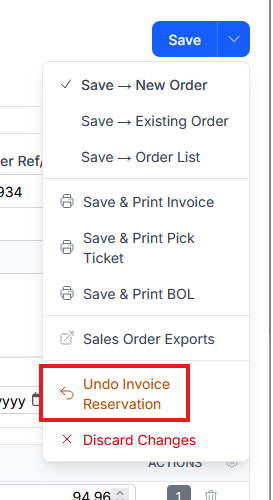
- Select the drop down on the Save button and choose Undo Invoice Reservation
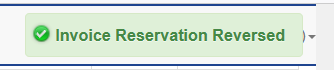
A confirmation message will appear in the top-right corner of the screen.. This removes the invoice reservation from the system.
Considerations When Undoing Invoice Reservations
Undoing an invoice reservation permanently retires the invoice number. The number cannot be reused or reassigned.
Before removing an invoice reservation, verify that the invoice number has not been sent to the customer or any external systems, such as:
- ASN transmissions
- EDI messages
- confirmations
- shipping paperwork
If a new invoice number is later assigned, it may not match previously transmitted information. This can result in:
- customer reconciliation issues
- rejected EDI transactions
Invoice reservations should only be removed when it has been confirmed that the invoice number has not been communicated externally.
If there is any uncertainty, contact Anovys Support before proceeding.