Periods Functions
Defining Periods
Before any GL functions can be used, accounting periods must be created. Sprout supports many styles of accounting periods. Examples are monthly periods consisting of calendar months, thirteen four week periods, and 4-4-5 accounting periods.
To define the periods choose GL - Periods.
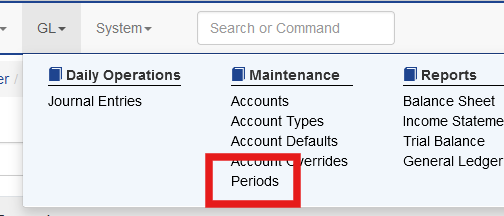
Click Create Period

Enter the required information:
Year: The fiscal year
Quarter: The quarter within the fiscal year
Period: The period number within the fiscal year
Start Date: The first calendar day that the period includes
End Date: The final calendar day that the period includes
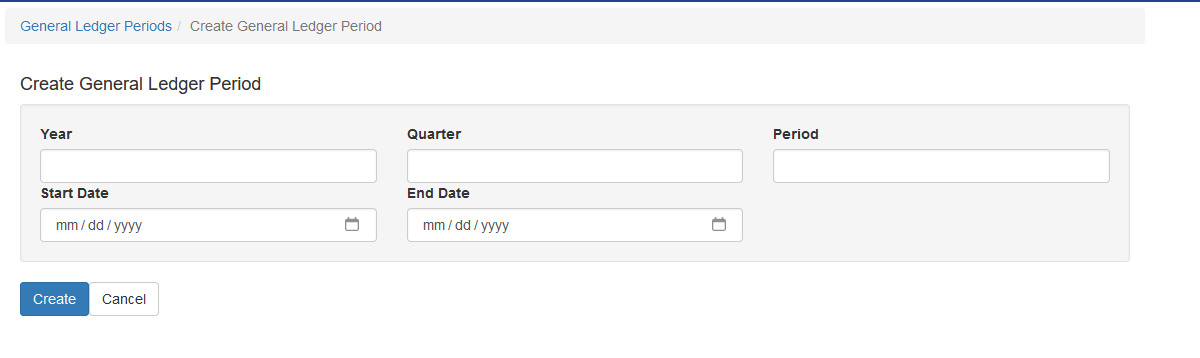
Once all information is entered click create.
Note: Once a period is created and records are entered editing the definition becomes impossible. If adjustments are needed please contact support@anovys.com
Closing a Period
When the accounting period is closed the system locks the current period so future entries can’t be posted to it as well as finalizes the ending balances of the accounts and rolls them into the next period as their beginning balance.
When a user is ready to close the period select GL - Periods. Click Close Period.

There must be a subsequent period to close the current period to.

Reopening a Period
From time to time a user may need to post entries to a prior period. Users with the correct rights can click Open Period to reopen the period. Every period between the current one back to the one the user needs to reopen must be opened in order from current to furthest back.

When a period is reopened and then subsequently closed, the ending balances are recalculated and updated in the system.