
Uom
Case Equivalency
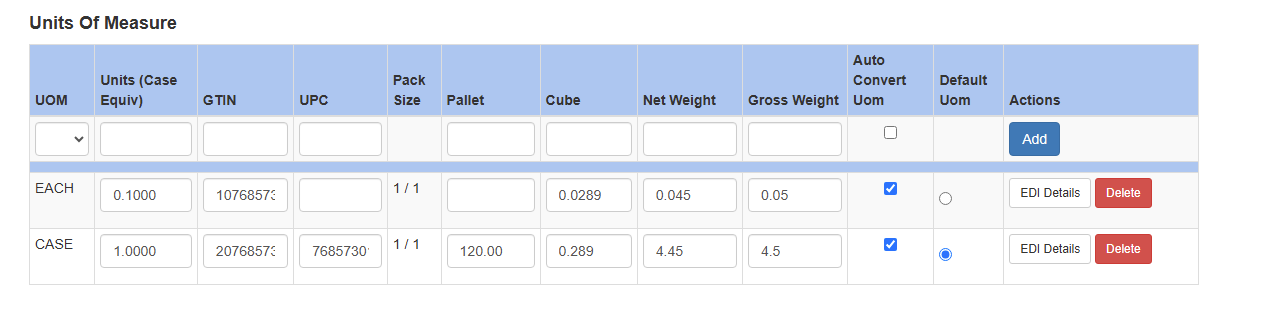
When creating an item you must at a minimum create a master unit of measure. Often this is the case. Select the item and be sure to enter 1 for Units (Case Equiv). Click Save immediately after setting the first UOM. For the master, once it is saved, choose Default UOM
The default UOM is the unit of measure that is used to show on the status screen and other reports the quantity of an item you have. For example, if an item is a 4/5# salad mix typically the default UOM is the case. If you had 120 cases on hand and sold one five pound bag your on-hand inventory would be decreased by .25 leaving you with 119.75 cases on hand.
If there are additional units of measure you can add them here.
The Units (Case Equiv) field tells Sprout’s inventory system how much product to remove from inventory as the UOM is used. This is typically a number less than 1. For example, if a master case weighs 8 pounds and a unit of measure LB is one pound, the Units would be 0.125 since ⅛ is 0.125
Additional Fields
UPC and GTIN
For items with UPCs and GTINs the data should be entered here as needed.
Pallet, Cube, and Weight Details
The pallet, cube and weight details define the physical characteristics of a Unit of Measure.
The pallet is the number of items in that unit of measure fit on a standard pallet. This is usually not used for break units of measure, such as each.
Cube is the cubic foot of the individual item. For reference, if an item is in cubic inches can be converted to cubic feed by dividing the cubic inch value by 1728.
Gross weight is the weight of the product and any associated packaging.
Net weight is the weight of the actual product only.
Notes on Weight
Net and Gross weight are used on PO sets. Once an item is on a PO set the weight is locked for editing until any PO that is a member of a PO set has been received.
Require Net Weight Option
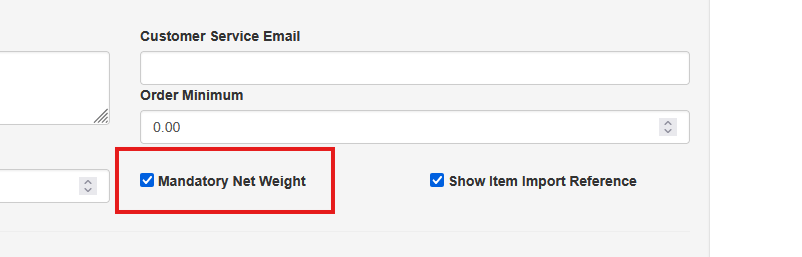
Net weight is used often within the system, the ability by management to require a net weight is controlled at the company level.
To turn this on or off visit System - Company Site. Check the Mandatory Net Weight option to require net weight whenever an item is edited or created.
Auto Convert
The auto-convert checkbox should be checked if Sprout’s inventory system should auto allocate units of measure in sales. The master and smaller units of measure must be checked to use this. You must also click the auto convert UOM checkbox on the main screen
Be sure to click Save after making changes