Midweek Price Change
Midweek price change is used to update a single item at a time, across one or more price levels. This can be used for multiple reasons, such as adding pricing for a new item not carried during the prior pricing cycle, or adjust for a rapid change in market conditions to protect against a rising market.
Midweek pricing only shows one item at a time across all price levels.
Enable a Level For Midweek Changes
When Midweek Changes is checked the price level is automatically selected for update. This can be overridden on the Midweek utility.
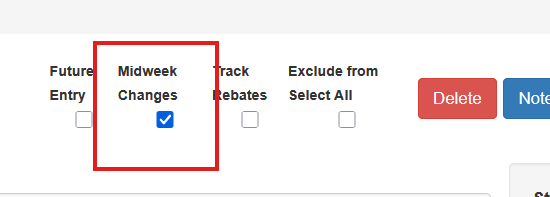
Levels do not specifically have to be selected to use mid week price changes, but when a level is selected the midweek price tool opens with the level(s) selected.
Using Midweek Price Changes
To use midweek pricing go to IC - Maintain Level Prices (Mid Week). Search for and select an item from the Item Search box
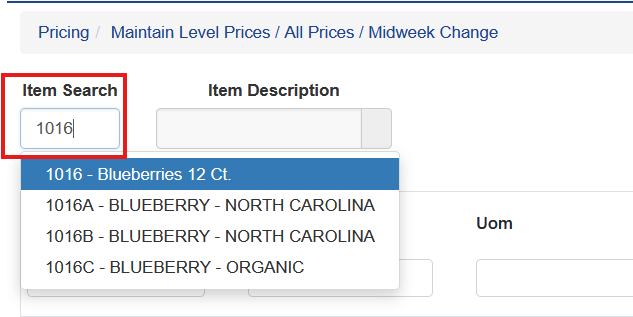
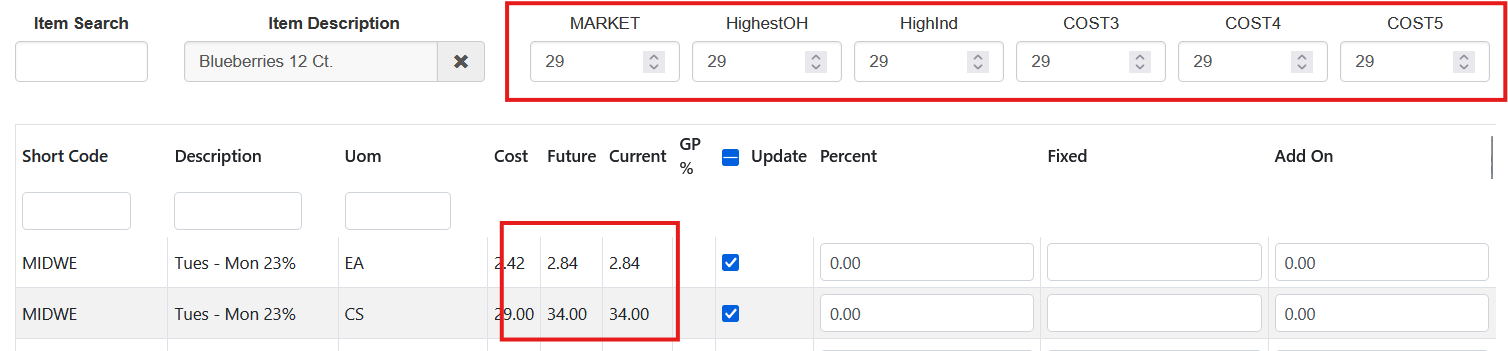
When you select an item the Midweek utility will pull any cost base data that currently exists. This is the same data available under the Maintain Pricing Costs screen.

If no cost data exists in the Cost Base data the costs will show all zeros.

How To Generate Costs
If the user is only getting zeros it is because the cost base hasn’t been calculated. This typically occurs with new items or items that have been reactivated recently.
To calculate costs use the regular cost calculation tools.
Recalculating And Updating Pricing
Adjust the cost(s) accordingly to the new, desired, cost. Then check or uncheck the desired levels. Once all the settings are in selected click Recal at the bottom. The new prices will be calculated using the price level parameters and the new cost to update the Current and Future price on the price level.
Zero All Costs
The midweek tool can also be used to zero all costs by putting zero in for all cost bases and recalculating the selected levels.