Price Level Parameters
Price level parameters in Sprout are used to generate the final sell price to the customers that are assigned to that price level.
Future Entry
Future entry allows an order to be entered for a customer on a price level after the date the price level expires. This will pull the price from the future column. This is covered in more detail below.
Midweek Changes
When a price level is checked for Midweek Changes the level is automatically selected for updating using the midweek change tool. More on this is furter explained under Midweek Price Updates.
Track Rebates
Exclude from Select All
Cost Range Pricing
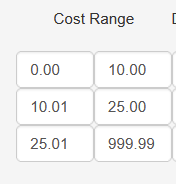
Grid pricing is the most frequently used pricing format. Cost ranges are broken down into a start and end value, such as $0.00 to $10.00, $10.01 to $25.00, and so on. Each cost range can be given a different set up markup criteria.
Adding a Range
To add ranges, on the Price Levels screen click edit. On the level screen click Add Range and add the number of ranges needed.
Make your final range higher than you will have any cost
Setting Mark Ups
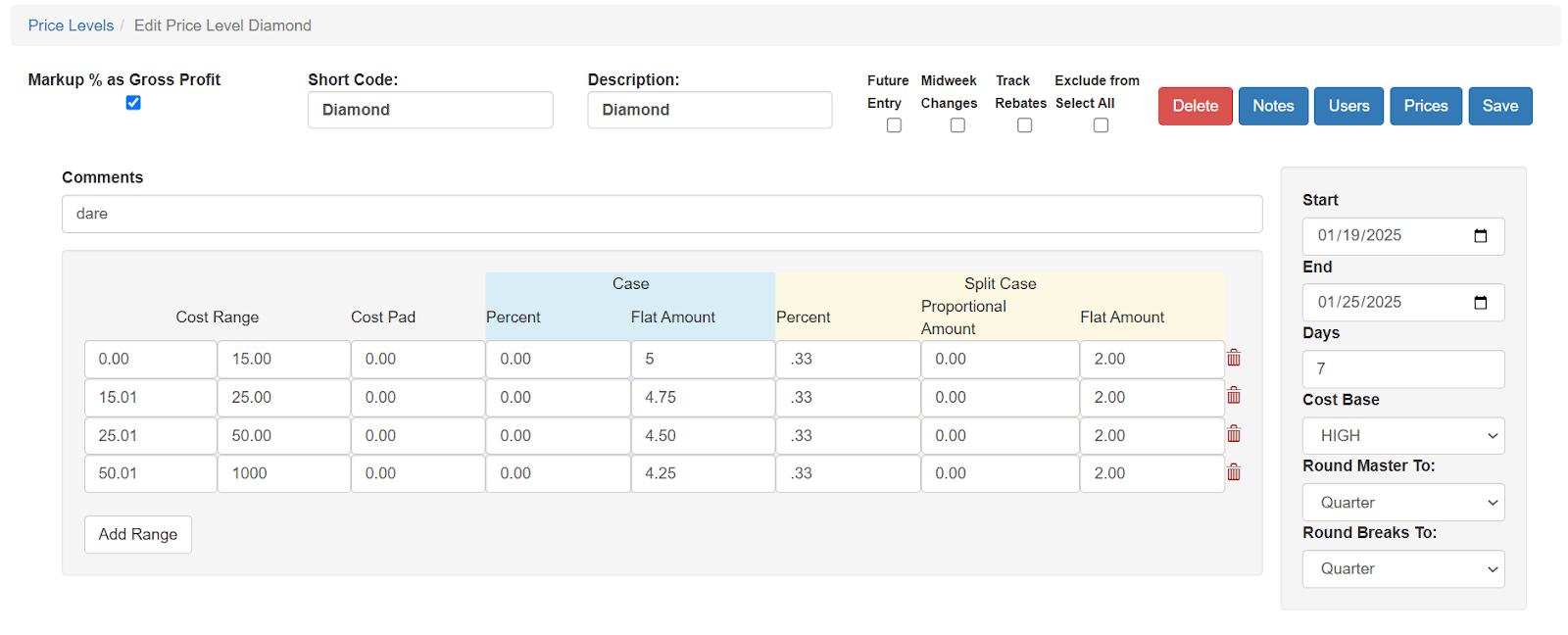
Once the cost ranges are defined the user can set the markup. This can be a percent markup, a dollar markup or a mix of both.Additional cost pads can be added as well that are added to the cost base. For split items, There are settings for both cases and units of measure other than 1.
In this example we have marked different price ranges up by a fixed dollar amount. Splits are marked up by 33% and a $2.00 flat amount is applied to splits. The resulting price is rounded to the nearest quarter.
Percentages are also calculated to produce a gross profit markup. More on that is described below.
Percentage Markups
When entering a percentage markup it is entered as 0.10 for 10% or .15 for 15%
Rounding
Rounding is applied separately to the master and break units of measure. Options are none, nickel, dime and quarter. This rounding occurs after all other calculations are applied. Note, rounding always rounds up to the next highest value. The system never rounds down.
For example, an item that calculates out to $14.51 will round to $14.75 if the rounding for a case is set to quarter.