UOM - Units of Measure
 default
Case Equivalency
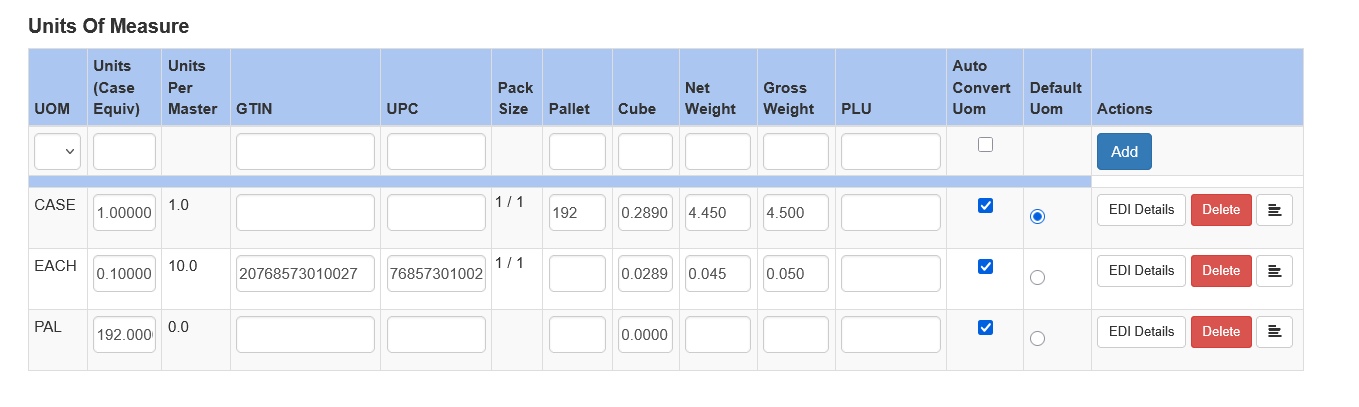
When creating an item you must at a minimum create a master unit of measure. Often this is the case. Select the item and be sure to enter 1 for Units (Case Equiv). Click Save immediately after setting the first UOM. For the master, once it is saved, choose Default UOM
The default UOM is the unit of measure that is used to show on the status screen and other reports the quantity of an item you have. For example, if an item is a 4/5# salad mix typically the default UOM is the case. If you had 120 cases on hand and sold one five pound bag your on-hand inventory would be decreased by .25 leaving you with 119.75 cases on hand.
If there are additional units of measure you can add them here.
The Units (Case Equiv) field tells Sprout’s inventory system how much product to remove from inventory as the UOM is used. This is typically a number less than 1. For example, if a master case weighs 8 pounds and a unit of measure LB is one pound, the Units would be 0.125 since ⅛ is 0.125
Additional Fields
UPC and GTIN
For items with UPCs and GTINs the data should be entered here as needed.
Pallet, Cube, and Weight Details
The pallet, cube and weight details define the physical characteristics of a Unit of Measure.
The pallet is the number of items in that unit of measure fit on a standard pallet. This is usually not used for break units of measure, such as each.
Cube is the cubic foot of the individual item. For reference, if an item is in cubic inches can be converted to cubic feed by dividing the cubic inch value by 1728.
Gross weight is the weight of the product and any associated packaging.
Net weight is the weight of the actual product only.
Notes on Weight
Net and Gross weight are used on PO sets. Once an item is on a PO set the weight is locked for editing until any PO that is a member of a PO set has been received.
Require Net Weight Option
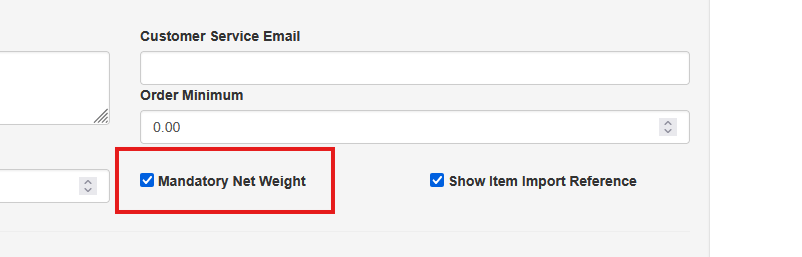
Net weight is used often within the system, the ability by management to require a net weight is controlled at the company level.
To turn this on or off visit System - Company Site. Check the Mandatory Net Weight option to require net weight whenever an item is edited or created.
Auto Convert
The auto-convert checkbox should be checked if Sprout’s inventory system should auto allocate units of measure in sales. The master and smaller units of measure must be checked to use this. You must also click the auto convert UOM checkbox on the main screen
Default UOM
As mentioned above, this is the default UOM. This is what value is used for the Status screen as well as converting sales and purchases to a standard UOM for display purposes.
Be sure to click Save after making changes
Additional UOM Fields
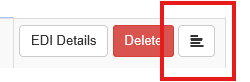
Additional UOM Fields are shown under the additional fields button

Packaging Type and Weight
The packaging type and weight are used in the Packaging Tracking Module. More can be found under that section.
Pack Details
Pack Details describe how individual units are packaged within an item's outer Unit of Measure (UOM). These values may be used for EDI transactions, inventory calculations, customer or vendor requirements, and other processes where Sprout needs to understand the quantity and packaging structure contained within the outer UOM.
For a Case UOM, the basic relationship is:
Inner Packs Per Case × Units Per Inner Pack = Total Units Per Case
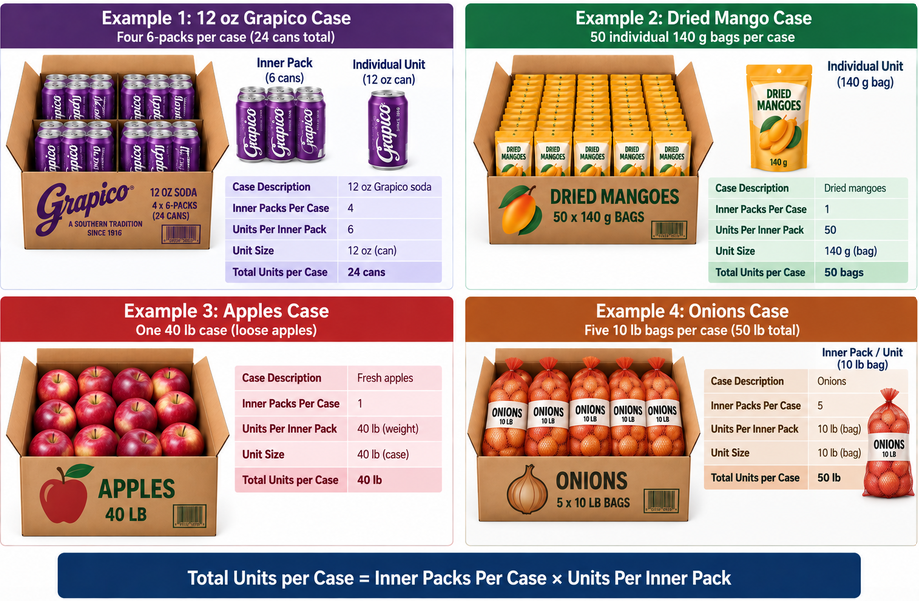
Example 1 - Soda: A case containing four 6-packs of 12 oz Grapico cans has 4 Inner Packs Per Case and 6 Units Per Inner Pack, for a total of 24 cans.
Example 2 - Dried Fruit: A case containing 50 individual 140 g bags of dried mangoes has 1 Inner Pack Per Case and 50 Units Per Inner Pack, for a total of 50 bags.
Example 3 - Fresh Apples: A 40 lb case of loose apples has 1 Inner Pack Per Case and 40 Units Per Inner Pack, where the unit is pounds, for a total case weight of 40 lb.
Example 4 - Retail Onions: A case containing five 10 lb bags of onions has 5 Inner Packs Per Case and 10 Units Per Inner Pack, where the unit is pounds, for a total case weight of 50 lb.
Inner Packs Per Case
The number of inner packages contained within the outer UOM.
For example, a case containing four 6-packs of Grapico would have 4 Inner Packs Per Case. Each 6-pack is considered one inner pack.
If the product does not have a separate intermediate packaging level, the value may be 1. For example, a case containing 50 individual bags of dried mangoes would have 1 Inner Pack Per Case, containing 50 individual units.
Units Per Inner Pack
The number of individual units contained within each inner pack.
For the Grapico example, each inner pack is a 6-pack, so Units Per Inner Pack = 6.
For a case containing 50 individual bags of dried mangoes with no intermediate packaging, Units Per Inner Pack = 50.
Inner Pack UOM
Identifies the type or UOM of the inner package. This is a free-text value and may be determined by the terminology required by an EDI trading partner or other business process.
Examples could include Case, Count, Each, or another appropriate packaging description. When configuring EDI transactions the Inner Pack UOM is important. Please contact support for details on the EDI requirements.
Be sure to click Update after making changes